
MyChoice Benefits
BusinessolverBusiness
4.81.13K Reviews
- Version
- 3.5.7
- Installs
- 1.00M
- Age Rating
- Everyone
Screenshots
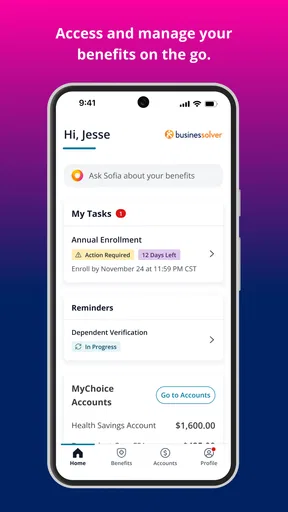
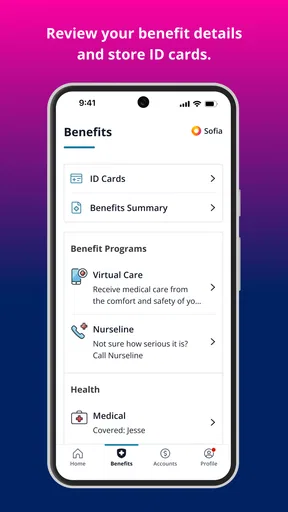
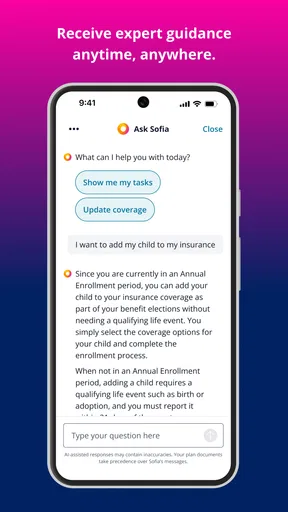
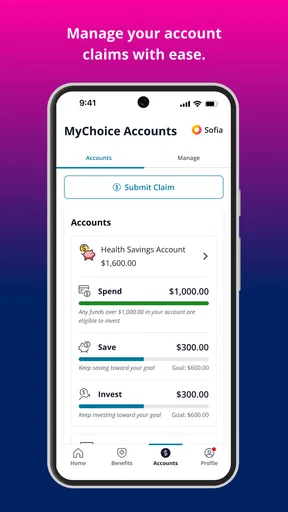
Our Review of MyChoice Benefits
 Analysis by Appyee
Benefits information is rarely something I want to hunt for when I am already dealing with a deadline, a medical appointment, or a question about enrollment. MyChoice Benefits is designed for that practical moment: it gives eligible users a mobile way to reach their benefits and enrollment information. I found its value less in entertainment or daily browsing and more in reducing the number of places I need to check when I am trying to understand an employer benefits task.
Developed by Businessolver, this free Business app is available to eligible users and is rated for Everyone. It has been available since February 17, 2017, and the current version is 3.5.6 for devices running iOS 10 or later. The app has passed half a million installs and holds a 4.7 average from around 8,600 ratings, which suggests that many people find the basic experience dependable. Still, those figures do not remove the most important question: whether your employer’s benefits arrangement is supported and whether your account details are ready.
Getting past the points where setup usually feels confusing
The first thing I would tell a new user is not to treat this as a general benefits search engine. MyChoice Benefits is an access point for eligible users, so the app becomes useful after the relevant benefits program and account relationship are in place. If you install it expecting to browse every possible insurance or workplace benefit without signing in, the experience may feel limited from the start.
Before opening it, I would gather the information normally associated with the benefits account, such as the sign-in details or enrollment instructions supplied through your workplace. I would also make sure I am using the same personal information that appears in the benefits record. A small difference in an email address, an outdated password, or choosing the wrong employer entry can look like an app failure even when the issue is really account matching.
That distinction matters because benefits platforms are more sensitive to identity details than ordinary shopping or social apps. If the app does not recognize you, repeatedly guessing credentials is rarely the best next step. I prefer to stop after a careful attempt, reread the enrollment instructions, and use the account-recovery route offered within the sign-in process if one is available. This avoids creating extra confusion with several slightly different passwords.
Another useful preparation step is checking the device itself. The listed minimum operating system is iOS 10 or later, so an older device should be checked before troubleshooting the account. On a compatible phone, I would close other apps, install the latest available version of the app, and restart the device if the screen behaves strangely. These are simple actions, but they separate a local installation problem from a benefits-account problem.
There is also a human factor. I would not begin setup while rushing through an enrollment deadline with several browser tabs and messages open. Benefits choices often involve names, dates, dependents, coverage options, and confirmation screens. Even when the app presents the information clearly, the decision still deserves a quiet review. My practical tip is to keep a note of what you intended to select before starting, then compare the final information with that note rather than tapping through from memory.
What the app is good at once access works
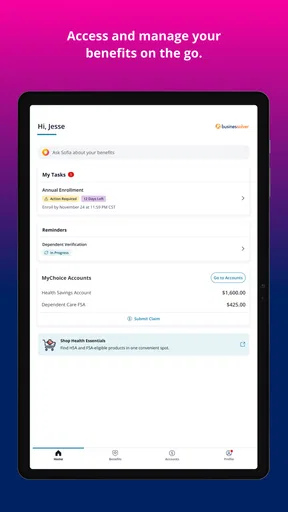
After access is established, the main strength is convenience. Instead of relying on a saved document, an old email, or a desktop-only routine, I can use a phone as the place to revisit benefits and enrollment information. That is especially helpful when I need to check something away from a desk, such as before calling a provider or while discussing a coverage question with someone in my household.
I see three especially sensible uses. The first is preparation: reviewing the information before an enrollment period so that questions are identified early. The second is confirmation: checking what was selected after completing an enrollment step. The third is reference: returning to the account when a benefits question comes up during the year. Treating the app as a reference tool rather than something to open constantly makes its purpose much clearer.
A realistic example would be a worker who receives a reminder that enrollment is open while commuting home. Rather than waiting until the next day to find a computer, that person can open the app, review the available information, and decide whether the task is simple enough to complete on the phone. If a question appears, the user can pause and seek clarification instead of making a rushed choice. The important benefit is not merely speed; it is having access at the moment the question arises.
My second practical insight is to use the app for verification, not just submission. After making a change, I would return to the relevant information and read it slowly. Look for the plan or option you intended, the people covered, and any effective-date information that is shown. A confirmation screen can be easy to dismiss, while a later review helps catch a selection that was misunderstood. I would keep any confirmation details presented by the service in a safe place, without storing sensitive information in an unsecured note.
A third useful habit is separating “I cannot find the information” from “the information is not available to me.” The app is intended for eligible users, and what appears can depend on the benefits arrangement connected to the account. If a particular option is not visible, I would first check that I am in the correct account and that the enrollment period or workplace eligibility applies. I would not assume that reinstalling the app will create an option that is not part of the account.
Recovering when a normal workflow breaks
When a page fails to load or a sign-in attempt goes nowhere, I use a short recovery sequence rather than repeating the same tap. First, I check whether the phone has a stable internet connection by trying another ordinary online task. If other services also struggle, the app may be fine and the connection is the real obstacle. If only MyChoice Benefits is affected, I close and reopen it, then try again after confirming that the app is current.
If the problem appears during sign-in, I carefully re-enter the details instead of relying on an autofill entry that may contain an old password or an outdated email address. I also check whether the keyboard has inserted a space or changed capitalization. These tiny errors are particularly easy to miss on a phone, and they can make a valid account appear inaccessible.
If the problem appears after signing in, I avoid immediately logging out unless necessary. I first note what screen I reached and what action preceded the problem. For example, a failed transition after selecting an enrollment item is different from being unable to open the account at all. That small record makes the next support conversation much more useful because it describes the workflow rather than simply saying that the app is broken.
For a frozen screen, a restart is reasonable. Reinstalling should be a later step, not the first one, because an app reset does not repair incorrect account details or a benefits record that needs attention. If you do reinstall, I would make sure I know the sign-in information beforehand and would avoid doing it immediately before a deadline. The goal is to remove a local app problem without turning a temporary inconvenience into a longer access problem.
There is a trade-off here between convenience and caution. A phone makes benefits information easier to reach, but a small screen can make long descriptions and selection details harder to compare. I would use the app for quick review and straightforward tasks, then move to a larger screen or contact the appropriate benefits support channel when the decision involves several complicated alternatives. Faster access is not automatically better decision-making.
When the app is not the cause of the problem
Some of the most frustrating situations are outside the app itself. Eligibility records, enrollment windows, employer configuration, and account status can all affect what a user sees. If the app opens normally but a benefit is missing, a selection is unavailable, or information looks outdated, reinstalling is unlikely to solve it. In that situation, I would compare the account information with the latest workplace communication and then contact the benefits administrator or support route associated with the plan.
This is also where expectations matter. MyChoice Benefits can provide convenient access to information, but it should not be treated as a replacement for professional advice about coverage, tax consequences, medical decisions, or a disputed benefits determination. I would use the app to understand what is displayed and to prepare precise questions. For a complicated case, the better choice is to speak with the responsible benefits team rather than relying on a phone screen as the final authority.
Privacy deserves a practical mention as well. Benefits information can be sensitive, so I would use the app on a device protected by a passcode and avoid signing in on a shared phone. I would also be careful when reviewing coverage details in public. This is not a criticism of the app specifically; it is a reminder that mobile convenience changes where private information may be viewed.
Compared with the usual alternatives, the app sits between a desktop benefits portal and paper or email instructions. A desktop browser is often better for comparing several options side by side, reading lengthy explanations, or completing a task that requires extended concentration. Paper documents can be useful for reference but become outdated or difficult to search. Email reminders may point you toward the right task but are not a complete account view. MyChoice Benefits makes the strongest case when I need a focused mobile check rather than a full research session.
That comparison also explains who should skip it as a primary tool. Someone who is not an eligible user, someone whose workplace does not connect benefits access through Businessolver, or someone who needs broad independent insurance shopping will not get the intended value. Likewise, users who dislike handling sensitive account tasks on a phone may prefer the desktop or administrator-supported route. The app is not trying to be a universal marketplace, and judging it by that standard would be unfair.
My practical verdict after using it as a benefits companion
I recommend MyChoice Benefits to eligible users who want a convenient way to reach enrollment and benefits information without waiting to sit at a computer. Its strongest quality is focus: it is built around the benefits relationship rather than surrounding the task with unrelated features. The good rating and substantial install base support the impression that the core experience works well for many people, although your personal result will depend heavily on account eligibility and the accuracy of your sign-in details.
My main reservation is not that the app is difficult in every situation, but that a smooth mobile interface cannot resolve every benefits problem. Account mismatches, missing eligibility, unclear workplace instructions, and complex plan decisions still require patience or human help. Users who understand that boundary are likely to have a better experience than those expecting the app to explain every policy question or repair every account issue automatically.
If I were recommending it to a friend, I would say this: install it before you urgently need it, confirm that your account can be accessed, and use it to review information before making an enrollment decision. Keep a larger-screen or support-based alternative in mind for complicated comparisons. The best workflow is to use the app for access and verification, then use the right human or official channel for anything it cannot clarify.
At no cost and with an Everyone content rating, it is an easy option to try when your benefits program supports it. I would not call it a substitute for careful reading, but I would call it a practical companion for checking enrollment information at the moment it matters. For eligible users who want benefits access in their pocket, that is a useful and realistic role.
Privacy and Permissions
See what permissions an app requests and how it handles your data.
- Photos/Media/Files
- read the contents of your USB storage, modify or delete the contents of your USB storage
- Storage
- read the contents of your USB storage, modify or delete the contents of your USB storage
- Camera
- take pictures and videos
- Microphone
- record audio
- Wi-Fi connection information
- view Wi-Fi connections
- Other
- view network connections, full network access, run at startup, draw over other apps, control vibration, prevent device from sleeping
Verdict
Strengths of MyChoice Benefits
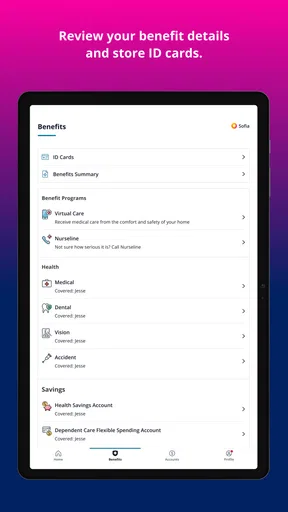
- Centralizes health, insurance, and wellness benefits in one app.
- Personalized benefit information makes plan details easier to find.
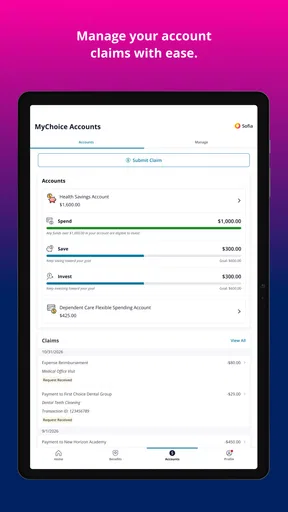
- Useful tools can help track eligible spending and available allowances.
- Mobile access lets employees review benefits away from a desktop.
- May simplify enrollment and benefit decisions during open enrollment.
Limitations of MyChoice Benefits
- Available features vary significantly by employer and selected benefit plans.
- Some users may need employer credentials or enrollment details to sign in.
- Benefit terminology can be confusing without additional plan documentation.
- Account or eligibility updates may not appear immediately after changes.
- The app is less useful when an employer supports only limited features.
Similar Picks in This Category
View All
LinkedIn: Community & Network
LinkedIn3.8

Zoom Workplace
zoom.com4.1

Microsoft Teams
Microsoft Corporation4.6

Meta Business Suite
Meta Platforms, Inc.4.6

Webex Meetings
Cisco Systems, Inc.4.5

TeamViewer Remote Control
TeamViewer4.4
Frequently Asked Questions
What is MyChoice Benefits used for?
MyChoice Benefits is a benefits-management app that helps eligible employees review and manage workplace benefits in one place. Depending on the employer’s plan, you may be able to compare medical, dental, and vision options, check coverage details, view important documents, manage dependents, and access enrollment information. The exact features available can vary by employer and benefit provider.
How do I log in to the MyChoice Benefits app?
To use MyChoice Benefits, you generally need an account connected to your employer’s benefits program. Sign in with the credentials provided during enrollment or use the registration option if you are a first-time user. Some organizations require a company-specific access code, employee ID, or identity verification. If you cannot log in, use the password-recovery tools or contact your benefits administrator.
Can I enroll in or change my benefits through MyChoice Benefits?
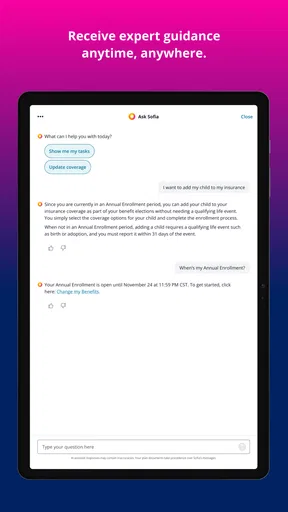
In many cases, the app allows eligible users to review and select benefits during an open-enrollment period or after a qualifying life event. You may be able to compare plans, add dependents, and submit elections digitally. However, available actions depend on your employer’s configuration and enrollment rules. Always review the confirmation details and deadlines before submitting changes.
Is MyChoice Benefits free to download and use?
The MyChoice Benefits app is typically free to download from the official Android or iOS app store. Access to the app is usually provided as part of an employer-sponsored benefits program, so you normally do not pay a separate subscription fee for basic use. Mobile data charges may still apply, and certain benefits or services may have their own costs.
Is my personal and benefits information secure in MyChoice Benefits?
MyChoice Benefits handles sensitive information such as enrollment choices, dependent details, and plan information, so you should use only the official app and keep your login credentials private. Security measures may include encrypted connections and account verification, but no online service is completely risk-free. Avoid signing in on public devices, enable available security features, and log out when finished.
